
Introduction
Are you tired of spending hours editing videos? What if you could turn simple text into engaging videos in minutes? Fliki.ai is one of the fastest growing AI tools designed to do exactly that. In this detailed review, we’ll explore what Fliki.ai offers, how it works, and how you can start creating videos fast — even with no prior editing experience. By the end of this guide, you’ll know exactly whether Fliki is a good fit for your content needs and how to use it step by step
What Is Fliki.ai?
Fliki.ai is a web-based AI video creator that turns written content into fully produced videos. Instead of spending hours editing, trimming, and recording voiceovers yourself, Fliki does this work automatically using artificial intelligence. Simply paste your script, ideas, or text and let the platform handle the rest — from visuals to voice narration.
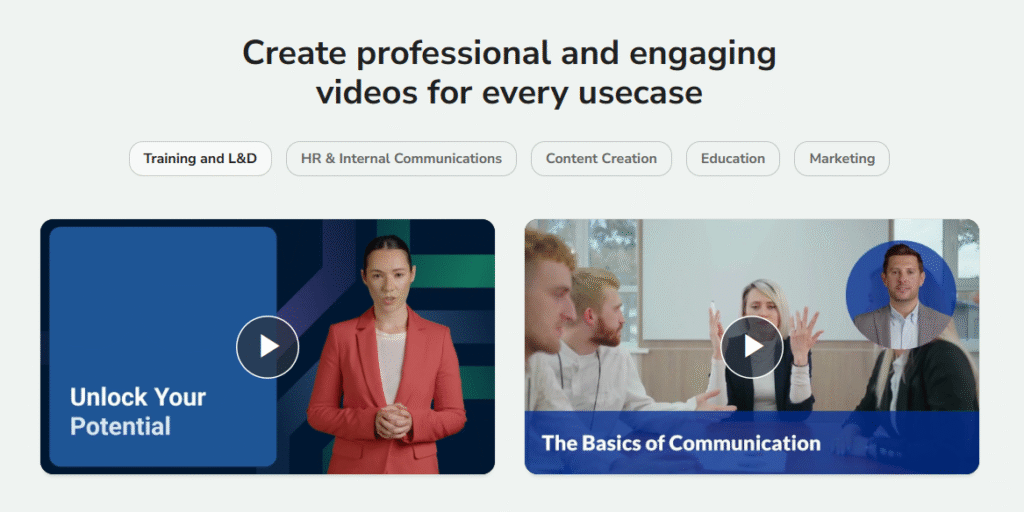
Most users find it especially useful for social media content, explainer videos, educational clips, training videos, and promotional content. It’s made for creators of all skill levels, so whether you’re a marketer, teacher, or blogger, Fliki can help streamline your video creation process.
How Fliki.ai Works: The Fastest Way to Create Videos
If you want to make videos quickly, Fliki.ai breaks the process into simple, logical steps. Below is a practical, beginner-friendly workflow:
1. Create an Account
First, sign up for a free account on Fliki.ai. You don’t need a credit card for the free tier, and it gives you a taste of the video creation features before upgrading.
2. Enter Your Script or Text
Paste your written content — whether it’s a blog post, script, or simple idea — into the text editor. Fliki’s AI reads this input to craft your video’s voiceover and sequence.
3. Choose AI Voices and Style
One of Fliki’s most notable features is its AI voice library, which offers thousands of voices in over 80 languages. You can select a voice that matches your tone and brand style.
4. Add Media or Let AI Select It
You can upload your own photos and videos or let Fliki’s AI choose visuals that fit your script. This saves time and ensures the video aligns with your message.
5. Preview and Export
Before finalizing, preview your video to make sure everything looks and sounds right. When you’re happy, export it in MP4 or MOV format and use it on YouTube, TikTok, or anywhere else you want.
With this approach, you can go from idea to finished video in a matter of minutes — making it ideal for busy creators or teams with tight deadlines.
Key Features of Fliki.ai
Fliki.ai packs many powerful features into one platform. Here’s a breakdown of what makes it worth considering:
Text-to-Video Conversion
With Fliki, you can convert scripts or written ideas directly into engaging videos. The AI automates scene selection, matches visuals, and syncs narration — saving you hours compared to manual editing.
AI Voiceover and Multilingual Support
One of Fliki’s biggest advantages is its AI voice library with more than 2,000 lifelike voices in over 80 languages and dialects. These voices sound natural and help your video feel authentic and professional.
Image to Video Conversion
Beyond text, Fliki can turn static images into dynamic video narratives. Just upload pictures and let the AI add motion, narration, and music.
AI Avatars and Voice Cloning
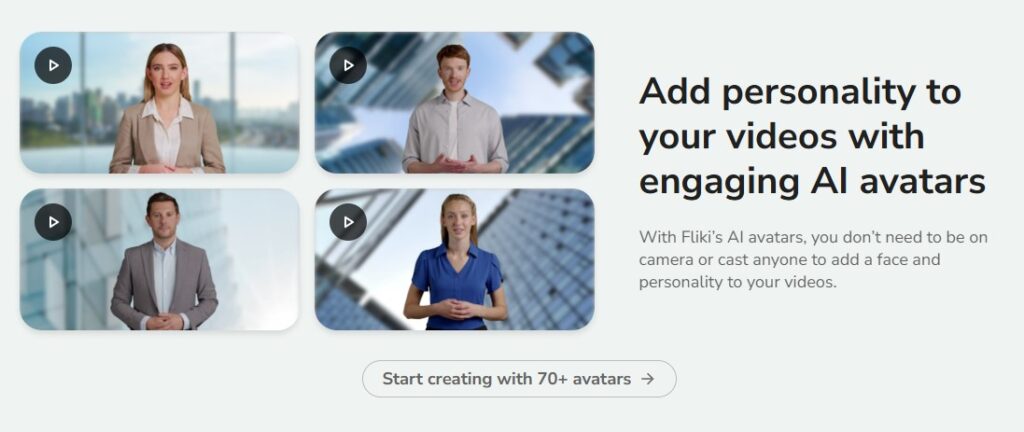
Some plans feature AI avatars — digital presenters that narrate your content — and advanced voice cloning, so your own voice can be replicated for video narration.
Blog to Video and PPT to Video
Fliki also supports converting full blog posts and PowerPoint slides into video content, making it invaluable for repurposing existing content for YouTube and social platforms.
Subtitles and Brand Customization
The platform automatically adds subtitles and lets you customize fonts, colors, and branding to match your identity and style.
Fliki.ai Pricing Plans Explained
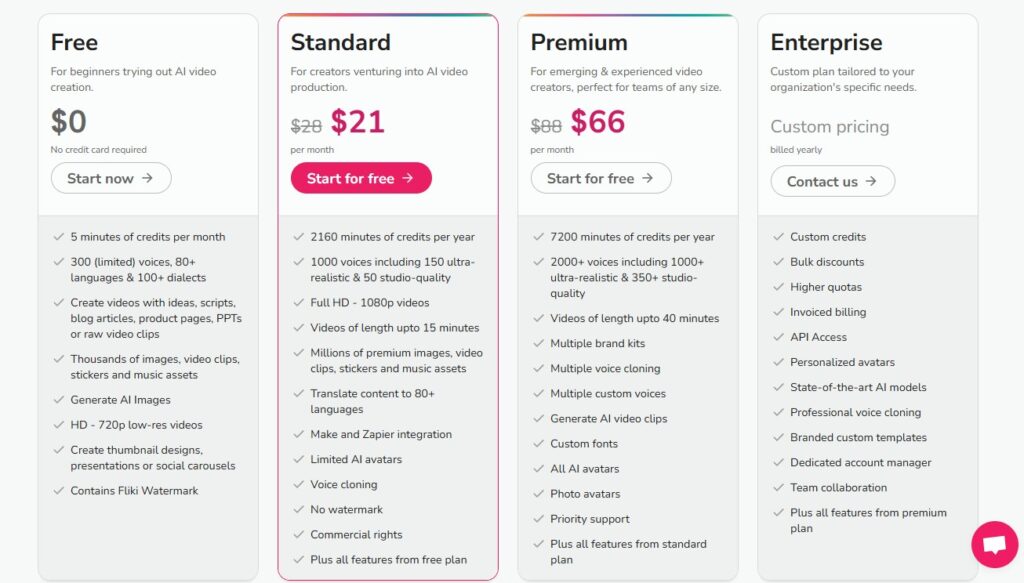
Fliki offers several pricing tiers to fit different needs, from beginners to professionals:
Free Plan
- 5 minutes of video credits per month
- Basic voices and limited features
- Includes Fliki watermark
- No credit card required
This plan is perfect for beginners who want to test the tool.
Standard Plan
- Around $21–$28 per month
- Full HD 1080p video exports
- More voices and premium media assets
- No watermark
- Commercial rights
Ideal for weekly content creators and small businesses.
Premium Plan
- Around $66 per month
- Thousands of voices and long-form video support
- Voice cloning and AI avatars
- Priority support
Best for agencies and creators with heavy video output.
Pros of Using Fliki.ai
Many users praise Fliki for its ease of use and speed. Some of the main benefits include:
✅ Fast Video Creation: Turn text into ready-to-share videos in minutes.
✅ Lifelike AI Voices: More realistic and human-sounding than many other tools.
✅ Beginner Friendly: No editing skills required.
✅ Multilingual Support: Create content for global audiences.
✅ Cost-Effective: Cheaper than hiring editors or voice actors.
✅ Flexible Outputs: Works for social media, training videos, explainers, and more.
Cons and Things to Watch For
While Fliki is powerful, there are a few considerations:
❗ Credit Usage Confusion: Some users find the credit system unclear if not explained upfront.
❗ Voice Quality Variations: While most voices sound good, some lower-tier options may feel less natural.
❗ Not a Full Video Editor: Editing flexibility is limited compared to professional tools.
Even with these points, Fliki remains a strong choice for creators prioritizing speed over deep editing control.
Who Should Use Fliki.ai?
Fliki.ai fits a wide range of creators, but it’s especially useful for:
Social Media Influencers
Quickly turn captions or ideas into shorts and reels.
Bloggers & Writers
Repurpose blog posts into engaging videos without recording voiceovers.
Educators & Trainers
Convert lectures and materials into digestible video lessons.
Businesses & Marketers
Produce polished promo videos and explainers fast, without a large budget.
No matter your niche, Fliki’s simplicity and automation make it a valuable tool for consistent content creation.
How to Get Started: A Practical Walkthrough
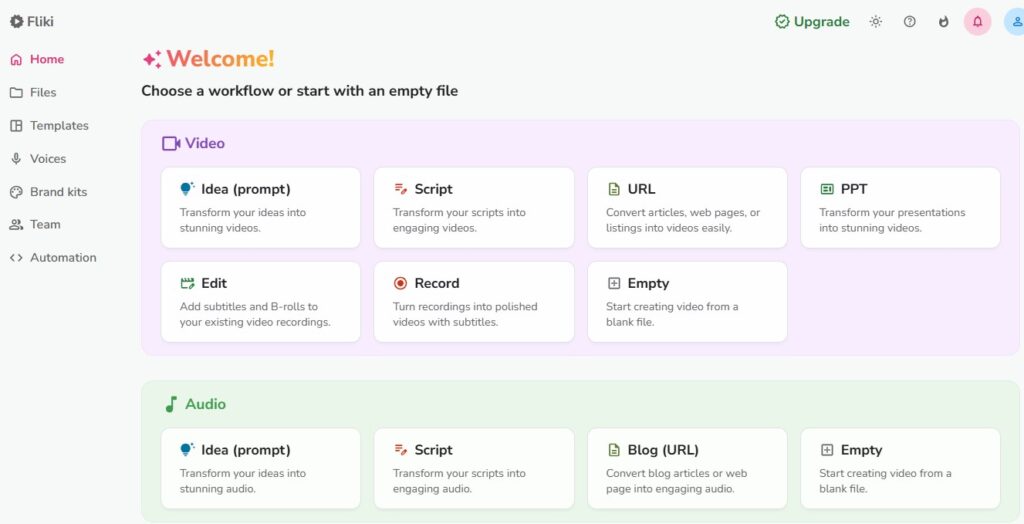
This section gives you a simple step-by-step example to create your first video with Fliki:
Step 1: Log In and Choose Video Type
Log into your Fliki.ai dashboard and select “Text to Video.” This is usually the quickest path to start your project.
Step 2: Paste Your Script
In the editor, paste text from your blog, script, or idea. Keep it clear and focused for best results.
Step 3: Pick Voice and Language
From the voice library, choose a voice that fits your content. You can preview voices before applying them.
Step 4: Choose Media and Customize
Select stock footage or upload your own. Adjust branding elements like colors and fonts.
Step 5: Preview and Export
Watch your video in preview mode. If everything looks good, export in MP4 format and share.
Affiliate Disclaimer
This article may contain affiliate links. If you click and purchase through these links, I may earn a small commission at no additional cost to you. This helps me continue producing unbiased, AdSense-safe content and keep the guides free for readers. I only recommend tools I genuinely believe are useful.